Wiring Your System
Rockhopper speakers are designed to operate as a unified stereo pair. The right speaker contains the internal amplification for both channels. To begin, use the provided three-conductor speaker wire to connect the two speakers at the screw terminals. Proper wiring is important, as incorrect connections can cause permanent damage. Never connect these terminals to third-party speakers or external amplifiers. The system is powered by a 28VDC adapter compatible with 110–240VAC wall power.
Powering On Your Rockhoppers
-
Power the system using the included 28VDC adapter. Outside the US, the power cord can be replaced with one using a C-7 connector.
-
Press the grey button to activate the system. A red LED indicates that the speakers are powered on; a green LED indicates that an audio signal is detected.
-
A faint pop during the power cycle is normal and is a standard characteristic of the amplifier. It is safe for the speakers.

Controlling Your Volume
The master volume control on the back of the right speaker adjusts the volume of both channels simultaneously.
For everyday listening, it is best to use the volume control on your source device. To establish a useful operating range, set the source to its maximum level and the speakers to their minimum level. Then gradually raise the speaker volume until you reach the highest level you expect to use. From there, the source device can be used for normal adjustments.
Wireless Bluetooth Connection
The Rockhopper system can be connected wirelessly to a Bluetooth audio source. Set the toggle switch on the back of the right speaker to the WIRELESS (up) position.
When the system is available for pairing, it will appear as WONDOM on your device. Only one Bluetooth source can be connected to the speakers at a time. To connect a different device, first disconnect the existing source.
If a connection fails, check that the previously connected device is no longer attempting to reconnect.
Establishing a Hardwired Line In Connection
For a wired connection, set the toggle switch on the back of the right speaker to the LINE IN (down) position.
The Rockhopper system accepts either a 3.5mm stereo connection or RCA inputs. Only one input method can be used at a time. When a 3.5mm cable is inserted, the RCA inputs are automatically disabled.
Expert Placement for Best Sound
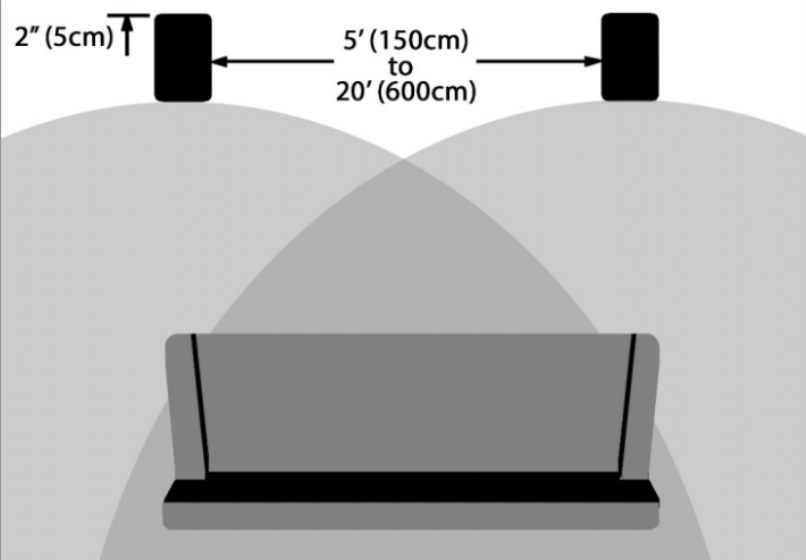
For optimal performance, the speakers should be placed on 28" stands, approximately 2' from the back wall. The right and left speakers should be positioned 5 to 20 feet apart. Positions such as shelf placement are acceptable but may not result in optimal performance.